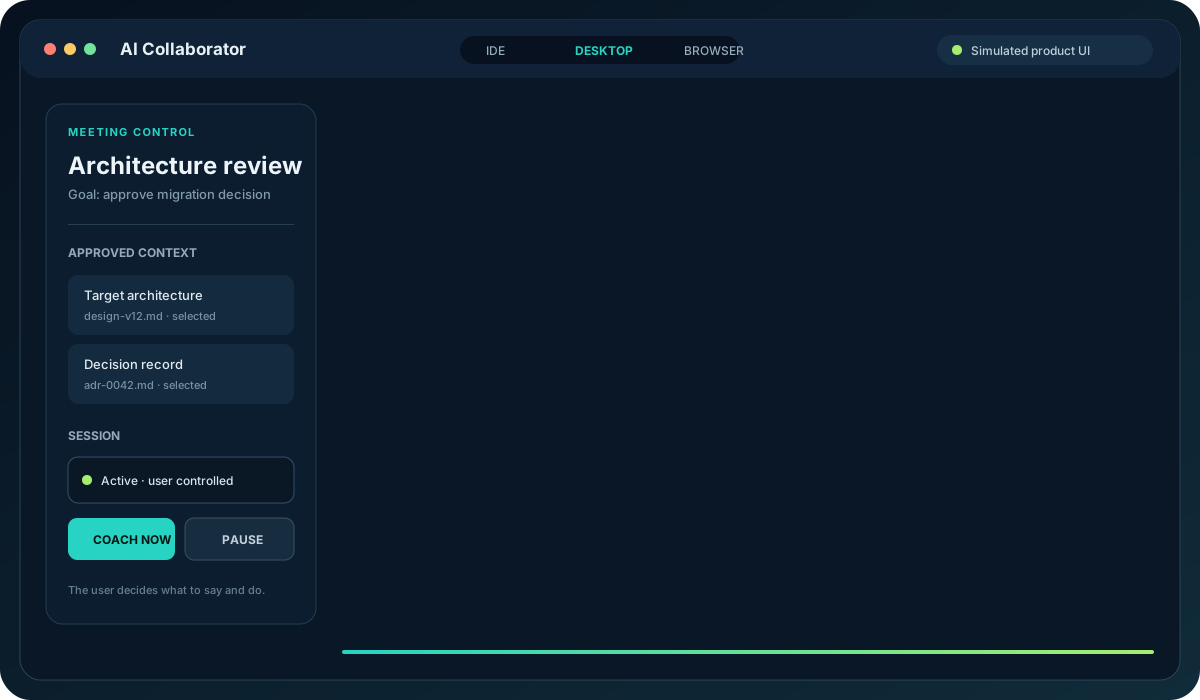
This representative animation illustrates the intended customer experience across the VS Code extension, installable application, and browser companions. It is explicitly synthetic—not a claim that every visual or workflow is final.
Representative UIAnimated · 12-second loop · no private implementation details
Capability walkthrough
From conversation to business intelligence.
Each panel below is a synthetic representation of a working capability or explicitly labeled platform direction. No customer data or fabricated production metric is shown.
Live transcriptACTIVE
We need to decide whether the identity dependency blocks the target date.
Who owns closure, and what evidence do we need?
Architecture can own the decision record; delivery will confirm timing.
Conversation historyRevision awareReviewable
AI traceGROUNDED
Request
Decision support
Trigger
Explicit question
Context
2 approved sources
Evidence
3 cited passages
Confidence
Calibrated
Outcome
Completed · retained
Representative trace metadata; no prompt or private content shown.
Post-meeting reportGENERATED
DecisionConditional approval
Actions2 identified
Open risks1 unresolved
Owner: Architecture lead
Timing: Confirm by Friday
Evidence gap: Identity closure
Synthetic example values, clearly separated from product-performance claims.
Organizational intelligencePLATFORM DIRECTION
Current decision
Prior architecture choice
Open delivery dependency
Superseded assumption
ContextIQ demonstrates local implementation of durable meeting evidence, review, organizational memory, and cross-meeting decision state. Production release remains gated.
Capability map
What the product family is designed to cover.
Capabilities are grouped by the customer outcome they support. Release status and exact packaging can differ by edition.
Capture and control
Live transcription and conversation history
Explicit participant-consent gate
Start, pause, resume, restart, stop, end, and forget controls
User-initiated typed requests
Session recovery and lifecycle diagnostics
Live intelligence
Automatic question detection and manual coaching
Suggested wording, backup reasoning, questions, and cautions
Concurrent coaching with ordered overflow
Confidence and confidence reasons
Answer history, pinning, follow-up, and session glossary
Grounding and evidence
Explicitly selected local document context
Bounded retrieval with file and line citations
Source-quotation validation and evidence-only fallback
Request-specific text and image attachments
Restricted public-source verification for explicit requests
After the meeting
Automatically archived transcript and AI trace
Responsive HTML business-intelligence report
Decisions, actions, owners, timing, risks, dependencies, and questions
Topic-to-outcome and evidence-confidence indicators
Portable export and local fallback reporting
Product surfaces
VS Code extension for technical work
Installable application for broader business use
Browser companion plugins
Basic and advanced meeting setup
Reusable profiles and explicit context selection
Extensibility ecosystem
File-, folder-, and workspace-based grounding
Authorized upstream business systems
Compatible agents, skills, MCP servers, and tools
Human-reviewed downstream actions
Configurable models, verification, and review gates
Compatibility requires permissions, policy approval, and tested adapters.
Platform expansion
Tenant-scoped meeting intelligence
Durable processing and human-reviewed insights
Organizational memory and cross-meeting decisions
Evidence-backed retrieval and governed exports
Downstream workflow and system-of-record actions
Platform expansion is not yet a production-certified commercial claim.
01
Prepare
Select the goal, audience, and authorized context that should shape the meeting.
02
Decide
Use concise wording, questions, cautions, and confidence guidance while the room can still act.
03
Act
Review the evidence, decisions, actions, risks, open questions, and next steps after the meeting.
Want the real release?
Join the free early-access list for readiness, pricing, and availability updates.